Everything your app can do once it is online
An app on Haechy behaves like a real company tool. Colleagues open it with the email they already use, it sends its own reports, it takes file uploads, it can sit at your own address, and every change you publish is checked and can be undone. You ask Claude. Claude sets it up.
You can do the asking from Claude, ChatGPT, Codex, Cursor, VS Code or Gemini CLI. They all connect to Haechy the same way (see the quickstart). Plans are noted next to each item, with numbers as of November 2026.
Start with an app that already works
Most people don't begin with a blank page, so Haechy doesn't either. Say "set up the expense claims starter for us" and a working copy is online in a minute or two, with its own address, database and sign-in. There are five to choose from:
- Expense claimsA receipt photo or PDF goes in, an approver says yes or no, someone marks it paid, and your bookkeeper gets a CSV.
- Leave requestsA yearly allowance, approvals and a calendar of who is off.
- BookingsThe shared van, the projector or the meeting room, with no double bookings.
- ApprovalsRaise a request, an approver approves or declines with a comment, and every step is emailed.
- Weekly check-inEveryone answers a few questions on their own time and a summary email arrives on Monday morning.
A starter is a starting point. Once it is online you can ask Claude to change the fields, the wording, who approves or the currency. It is private to you until you add people, and it uses one of your plan's app slots like any other app. Every plan can use starters.
Your colleagues open it with the email they already have
Every app asks people to sign in before a request reaches it. A colleague gets a link by email, clicks it and is in. No Haechy account, no password, no phone check, no Claude account. The link works once and expires after 15 minutes.
- Passkeys (every plan)
After the first emailed link, a colleague can save a passkey with Face ID, a fingerprint or the device PIN and skip the email next time. If they choose "Not now", that browser remembers.
- Google and Microsoft sign-in (Pro, Team and Business)
-
Colleagues use the work or personal Google or Microsoft account they already have, instead of waiting for a link.
- Who is allowed in
-
Your choice, set by asking Claude. The app can be private (you and the people you list), open to everyone in your workspace, open to anyone with an email at your company's domain (Pro and up), or public with no sign-in (Pro and up). Before an app goes public, Haechy shows you the pages and endpoints anyone could open without signing in, and it goes public only when you confirm. Free apps always require sign-in. The number of different people who can sign in across your apps is 5 on Free, 25 on Pro, 125 on Team and 500 on Business.
Adding people is a sentence in the chat ("give Priya and Tom access to the leave tracker"). If someone who isn't on the list tries to open the app, you get an email asking whether to let them in, at most once a day per person.
How sharing and sign-in work Give colleagues access without accounts
It keeps working while you're away
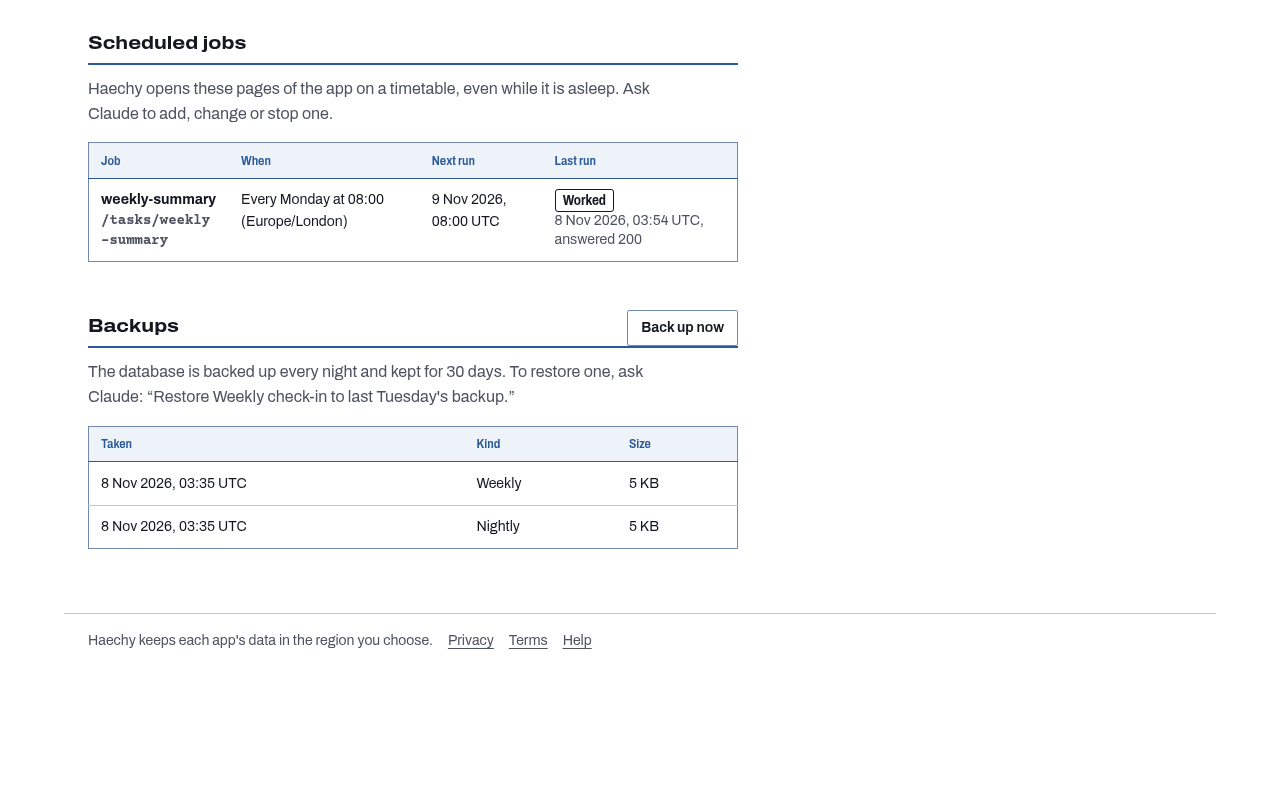
The Monday report that sends itself is the usual reason people reach for this. Tell Claude "email the team a summary every Monday at 8" and Haechy opens the right page in your app at that time, in your timezone, whether or not anyone has Claude open. The shortest gap between runs is an hour on Free, 5 minutes on Pro and 1 minute on Team and Business. You can test a schedule straight away by asking Claude to run it now. Scheduled jobs, with recipes
- Apps that email people
Your app can send notifications, approvals and summaries with nothing to set up with an email service. It can email people who have access to that app, and nobody else. Monthly allowance: 300 on Free, 5,000 on Pro, 15,000 on Team, 50,000 on Business. Sign-in emails don't count against it.
- Boards that refresh themselves
If you have a task board, a queue or a booking calendar, ask Claude to make it update on everyone's screen the moment one person changes something. Every plan. The starter apps don't do this out of the box, so ask Claude for it. Live updates
- Nightly backups of your data
Each app's database is backed up every night. Free keeps 7 days of nightly copies you can restore, and Pro, Team and Business keep 30, plus weekly copies for 90 days. "Restore yesterday's data" is a sentence to Claude, and a safety copy is taken first. Backups cover the database. Stored files and the app's code are separate things (see below). Backups and restore
- Awake when it matters
On Free, an app that nobody has opened for 15 minutes goes to sleep and wakes in a few seconds on the next visit. A scheduled run wakes it too. Paid plans keep apps running, up to a memory allowance per plan.
It looks like yours
On Pro and up, the app opens at an address like expenses.yourcompany.com as well as its Haechy address, with a certificate set up for you, and sign-in and passkeys work on it. You add one record at your domain provider and Haechy notices when it is in place. Pro includes 3 addresses, Team 20, Business 100. Your own address
Emails can come from your name too. Instead of expenses@haechy.app, your approvals and summaries arrive from expenses@yourcompany.com. Pro includes 1 sending domain, Team 5, Business 20. This sits on the same page, because the setup at your domain provider is the same kind of job. Email from your own domain
Receipts, photos and PDFs can be uploaded to your app and stored privately in the region you chose. Storage is shared across all the apps in your workspace: 1 GB on Free, 10 GB on Pro, 50 GB on Team, 250 GB on Business. Claude can list and delete files for you. File storage
On paid plans you can also ask Claude to hide the small "Sign-in and hosting by Haechy" line at the foot of your sign-in pages. Free apps always show it.
Changing it without holding your breath
Anyone who has built an app with an assistant knows the moment: you ask for a small change and something else stops working. These are the pieces that make that moment shorter.
- One step back
-
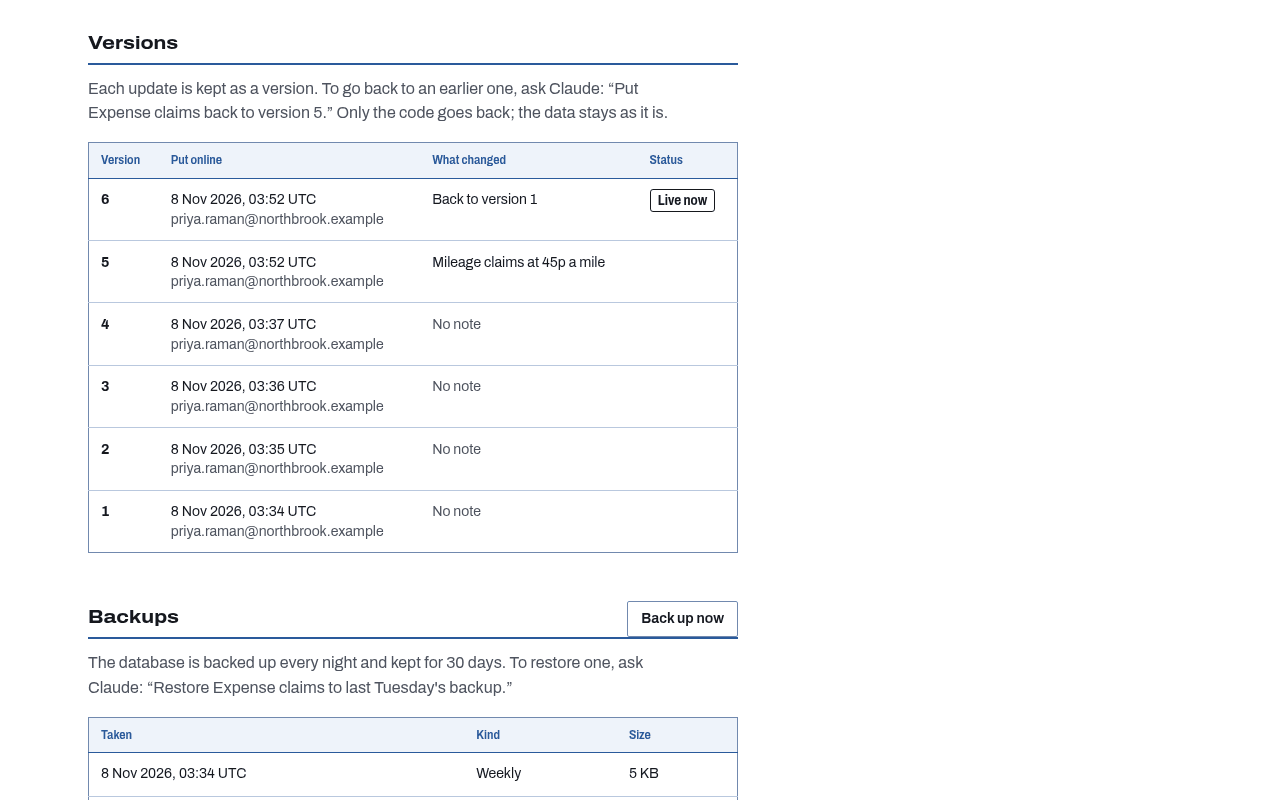
Every time you publish a change it becomes a numbered version with who, when and a one-line note. "Put it back how it was yesterday" works. The newest 20 versions are kept, and a rollback is itself a version, so you can undo the undo. A rollback moves the app's code only. Your data stays as it is, and restoring data is a separate request. Safe changes
- A look at the app before Claude says it's ready
-
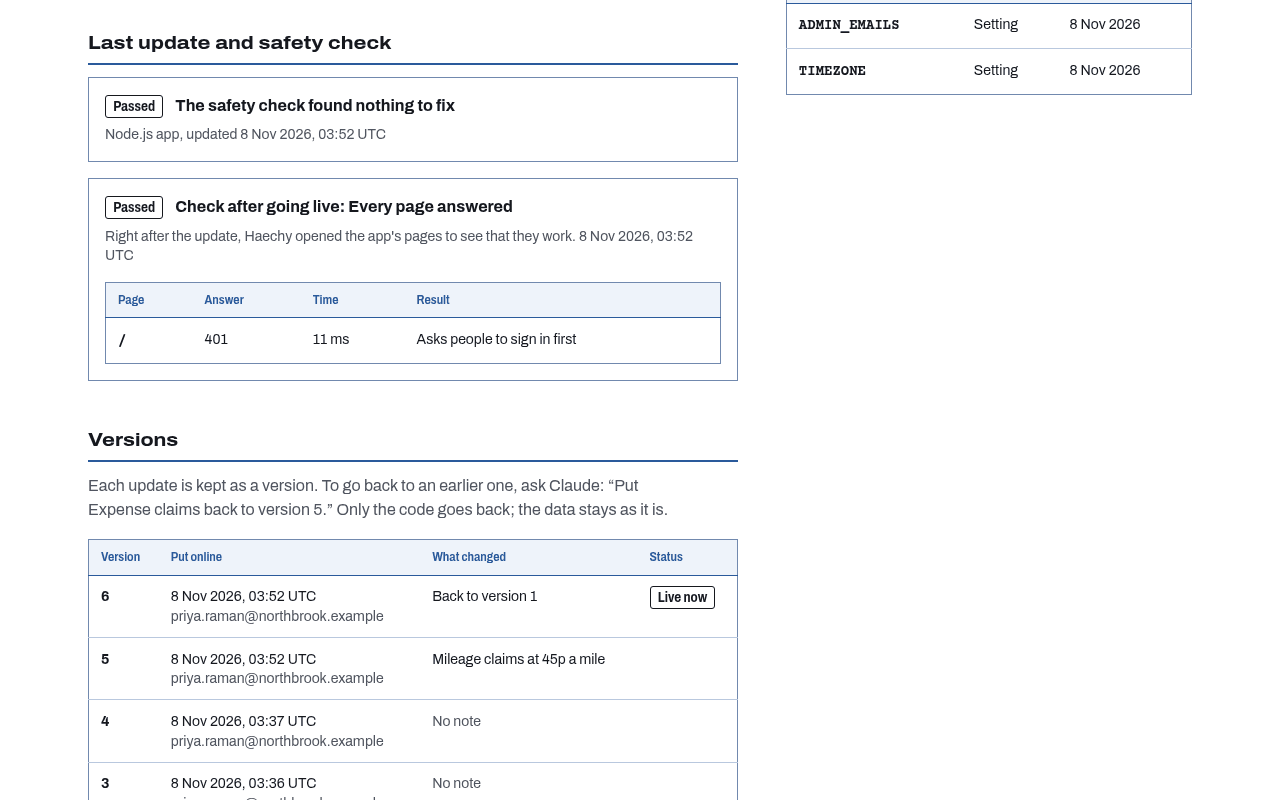
After each publish Haechy opens the app's home page and up to 10 pages you name, and reports what each one answered, with hints from the app's log when something looks wrong (a missing table, a missing setting, a blocked outside service). It checks that pages load. It doesn't sign in as a person or run a browser.
- A check on the code before it goes online
-
Before an app goes online, on every plan, Haechy looks for API keys and passwords typed into the code, for
.env-style files, for packages with known vulnerabilities or malware, and for risky code such as request input run as a command or as SQL. A key or.envfile always stops the publish and says which file and line, and where the key should go instead. A malicious package, a critical vulnerability in a package the app runs with, or input passed straight to a command or query stops it too, unless the workspace owner or an admin allows that exact finding. It also lists the outside services the code calls, with whether you have approved each. It doesn't find every bug. Keep API keys out of the app Claude builds - Settings and keys kept out of sight
Keys and settings you give Claude are stored encrypted, apply within seconds, and are never shown again. Only their names are listed.
- Outside services only with your say-so
An app can't reach anything on the internet until a person approves that exact service. Claude can ask for it, with a reason in plain English, but only you can approve (or an admin on Team and Business). Free allows 5 approved services per app, paid plans have no limit, and each one is still approved by a person. Decide what your app can reach
- Problems read back to you
Claude can read what the running app printed, which is how it finds out why a page failed and fixes it.
Knowing where you stand
- Usage
-
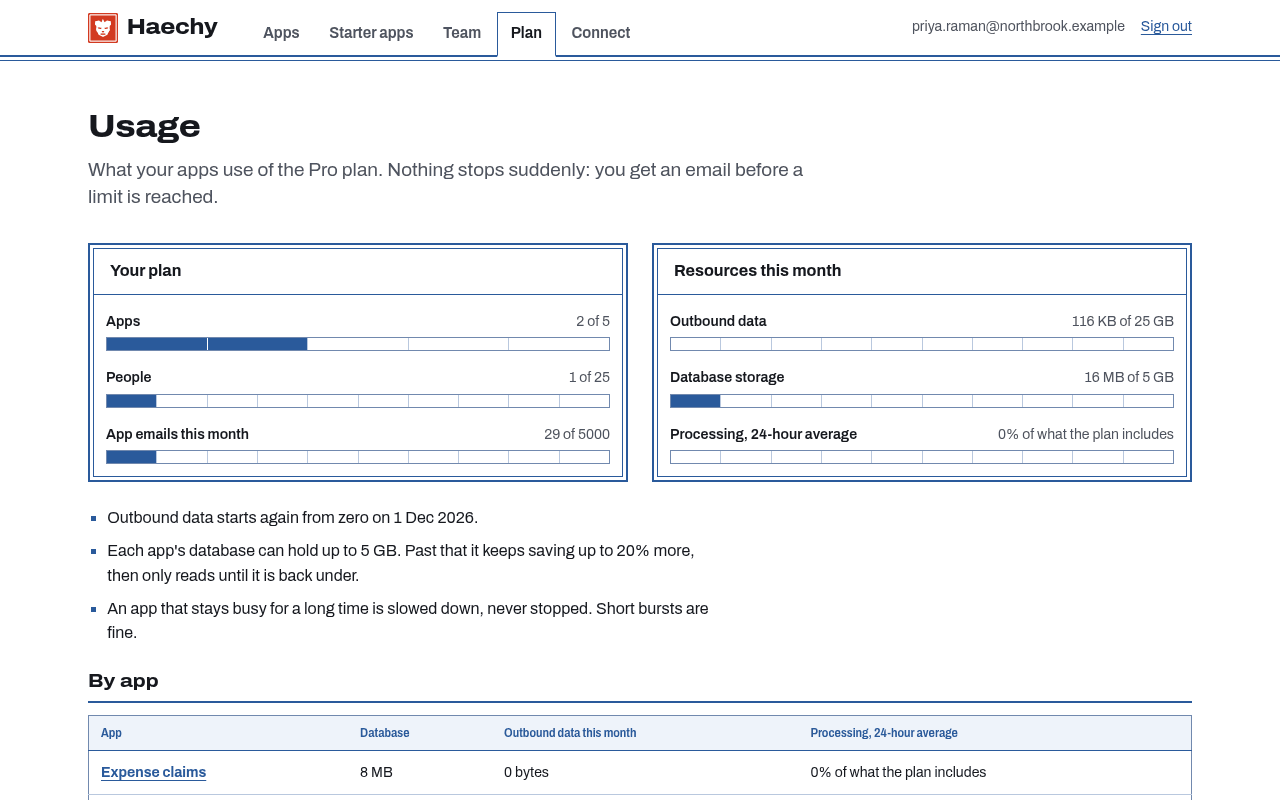
Ask "how much of my plan have I used?" and Claude shows storage, email, apps and people against the limits. You are warned at 80 percent of a limit, and nothing that is running gets switched off when you reach one. Plan limits
- Where it lives
-
Pick US (N. Virginia), EU (Ireland), UK (London) or Australia (Sydney) for each app. The app, its database, its backups, its stored files and its kept versions are stored in that region. Free uses one region per workspace, and paid plans can choose per app. The first app in a new region can take a few minutes to start.
Some services we use to send email, verify phone numbers and take payments process data outside your chosen region. See our sub-processors.
- What it can reach, on one page
-
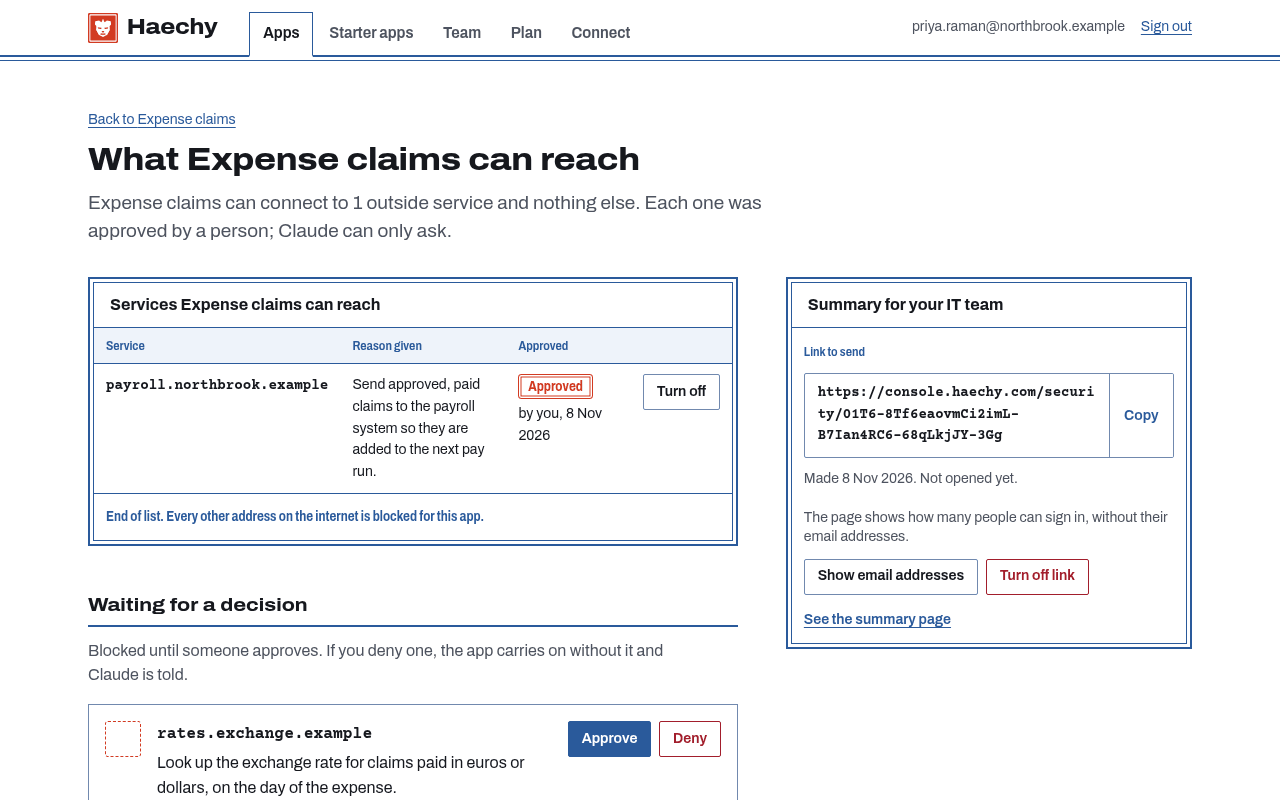
The Connections page lists every outside service an app can reach, why it was asked for, who asked, who approved and when, and any blocked attempts. You can approve, deny or switch one off there.
- Something for IT to read
-
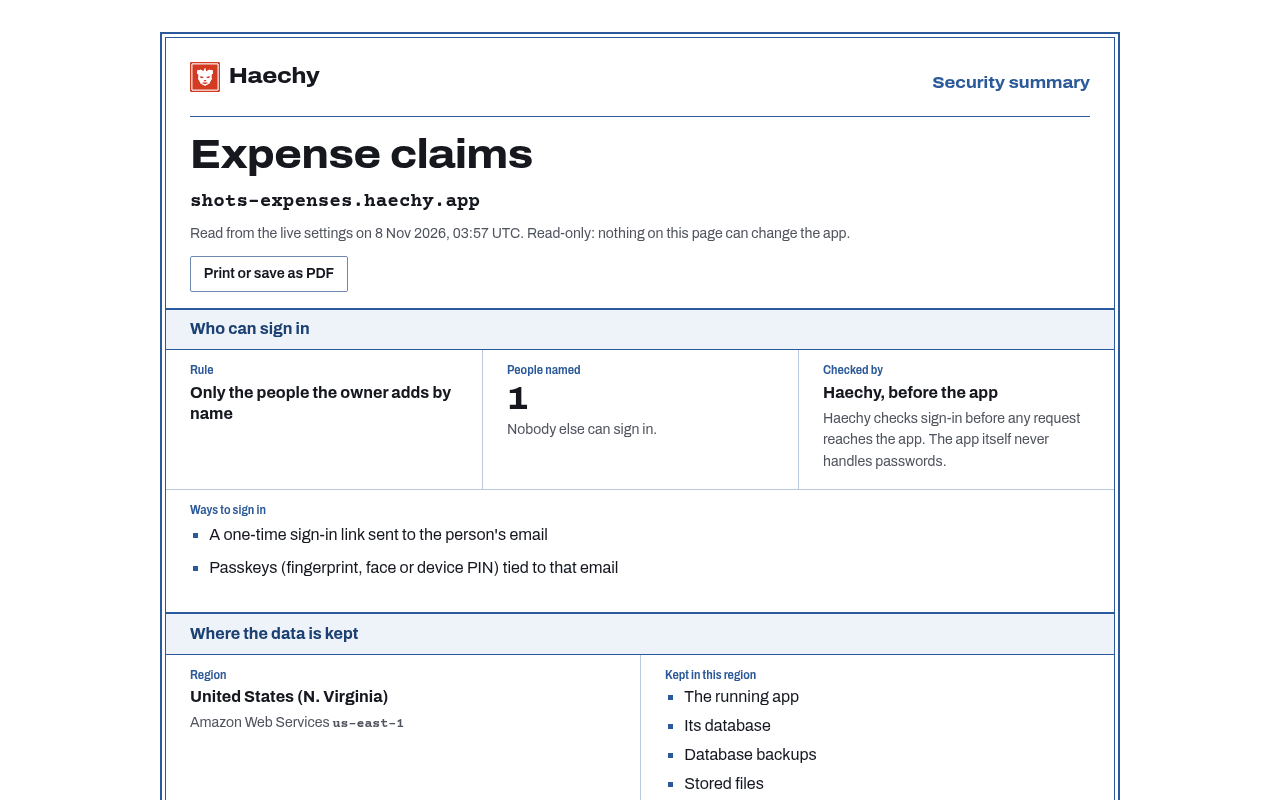
Ask Claude for "a page I can send to IT" and you get a read-only summary of one app: who can sign in and how, where its data is kept, which outside services are approved, the result of the last check, backup schedule and retention. It shows counts rather than email addresses unless you choose otherwise, and never shows a key or password. Anyone who has the link can open it, so share it like you would share a document link, and you can turn it off at any time. For IT
- How each app is kept apart
Every app runs in its own sandbox with a read-only filesystem, no root access and its own private network. Its database login opens that app's database and no other.
- Looking things up
The database belongs to the app, and Claude can read a record for you ("who has more than 20 days left?") or fix one. It reads up to 200 rows at a time, and before it changes anything it will suggest taking a backup.