Know how the week went before your Monday meeting starts
Each person spends two minutes a week on a short check-in: what went well, what is next, what is in the way, and how they feel. On Monday at 8:00 the manager gets one email with everyone's answers, blockers first. The questions are below to copy and use anywhere. If you want the form and the email running for you, ask Claude for the weekly check-in app.
A weekly check-in template you can copy
Paste this into a shared doc, a form or a chat message. It works the same without Haechy. It is the same set the app asks.
Weekly check-in (week of [Monday's date])

1. What went well this week?
2. What are you working on next?
3. Is anything blocking you, or worrying you? (Leave blank if not.)
4. How was the week? Pick one:
1 Rough, 2 Meh, 3 OK, 4 Good, 5 GreatThree short answers and one number is enough. It stays short enough that people keep doing it. The blockers box is optional on purpose: a blank answer tells you the same thing a long one would, and nobody has to invent a problem.
A few habits make a weekly status update template work better than the template itself:
- Ask for it at the same time every week, ideally Friday afternoon or Monday morning.
- Read the blockers first and the mood second. Go through the rest only if you have time.
- Reply to blockers within the day. People stop writing them down the first time one is ignored.
Optional extra questions
The app does not ask these. Pick one or two if your team needs them, and swap them in for the questions above rather than adding them on top. (If you run the app, you can ask Claude to change the questions. More on that below.)
- What did you learn this week?
- Who helped you, and with what?
- What is one thing we should stop doing?
- What would make next week easier?
- Is there something you need a decision on from me?The app that collects the answers
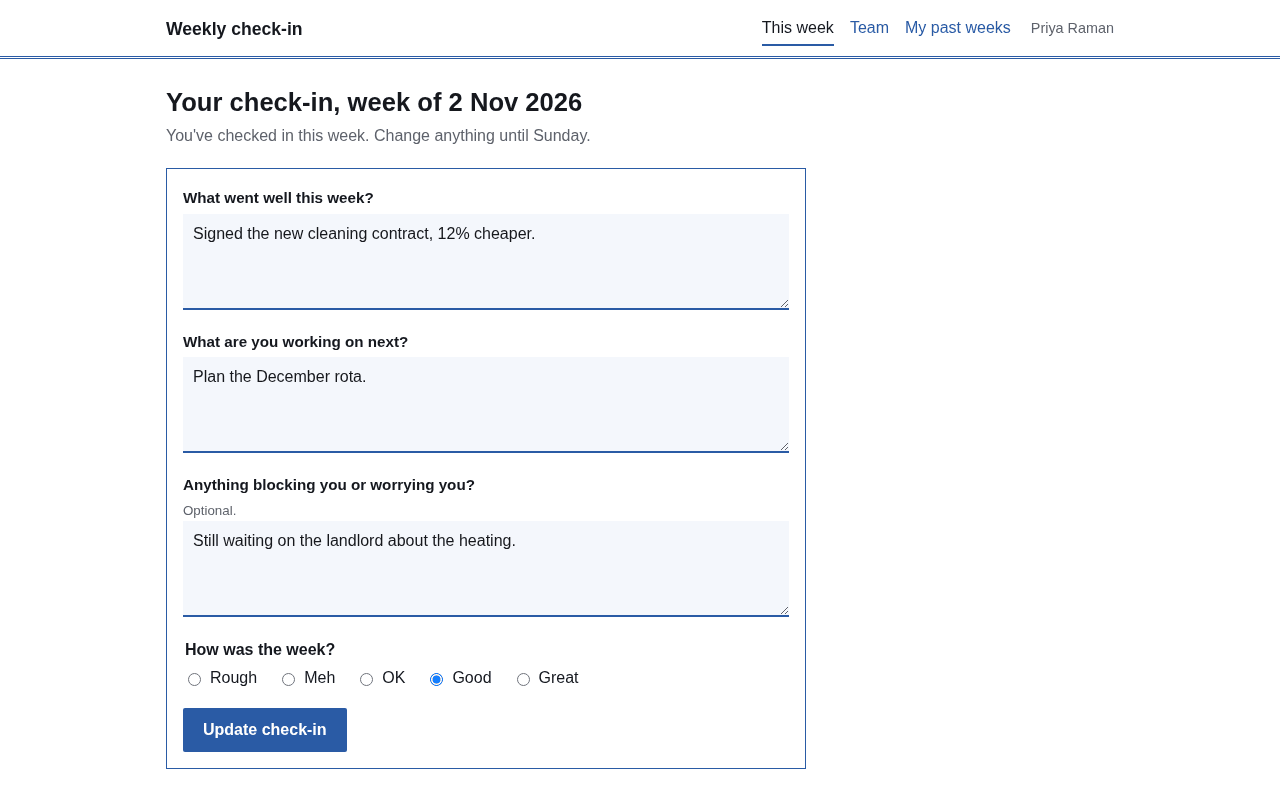
Ask Claude for the weekly check-in app and you get an online page for your team with the form above. Each person writes their answers and picks a mood from Rough to Great. They can change what they wrote until the week ends on Sunday.
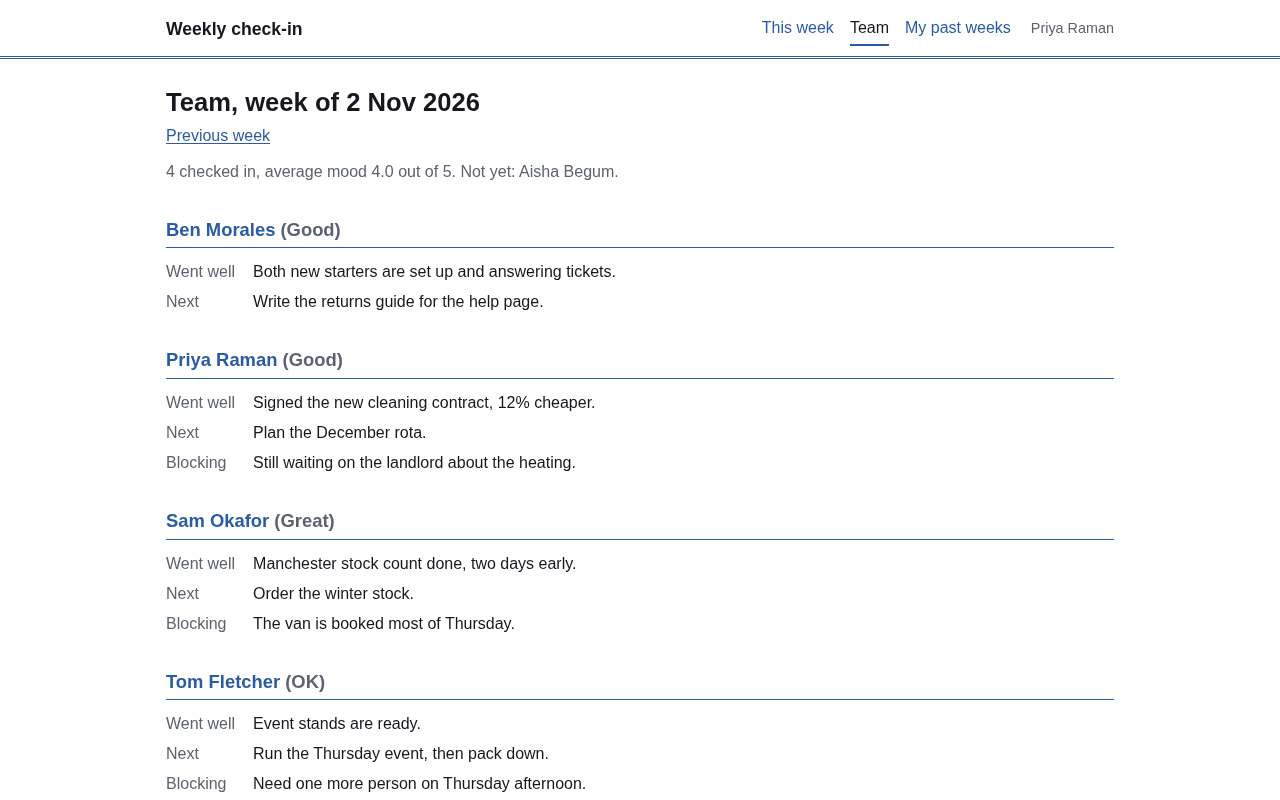
The Team page shows one week at a time: everyone's answers, the average mood out of 5, and who has not checked in yet. Past weeks are one click back.
To get it, say this to Claude with Haechy connected:
Set up a weekly team check-in on Haechy that emails me a summary every Monday.Claude puts the app online at its own address, with sign-in, in a minute or two. Then tell Claude who should be able to sign in, by email address. Anyone who should get the Monday email needs to be on that list too, or it cannot reach them. The app is private to you until you add people. There is no sample data: the Team page is empty until the first check-ins arrive.
What the Monday email contains
Every Monday at 8:00 in the app's time zone (tell Claude yours when you set it up), the app sends a summary of the week that just ended. The subject line reads "Weekly check-in: 6 answers, week of 2 Nov 2026" (the number and date change each week). It is a plain text email, and it goes to the app's admins and to anyone else you name as a recipient.
Inside, in this order:
- The names of people who did not check in.
- "Blocked or worried": everyone who wrote something in the blockers box, with what they wrote.
- Each person's mood, what went well, and what is next.
- A link to the Team page.
Blockers come before the good news so the thing that needs you is the first thing you read.
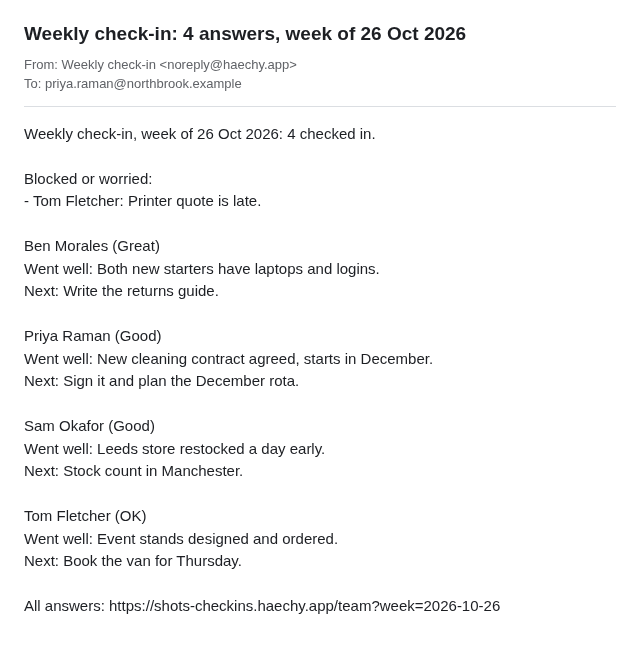
The email goes out once a week. It is a scheduled job that Haechy sets up for you when the app is created, and on the Free plan a sleeping app is woken up for the run, so the email still arrives. How schedules work, what you can change and how often they can run is explained on scheduled jobs.
The people who receive the summary need access to the app. An outside address, such as a client or an accountant, is refused, and the whole email is refused with it.
Who sees whose answers
By default everyone on the team can open the Team page and read everyone's answers. Admins always can. If your people would rather write to their manager than to the whole team, ask Claude to show answers to admins only. After that, each person sees only their own check-in and past weeks, and admins see everyone's.
Answers are never anonymous. The app records who wrote what, and so does the summary email.
Try the email before Monday
You do not have to wait for the first Monday. Ask Claude:
Run the weekly summary now.Claude runs the Monday job on the spot and the email lands in your inbox. It covers last week, so there needs to be at least one check-in dated last week for it to have anything to say. A run you trigger by hand sends another email, so use it to check the layout, not to resend.
Make the questions yours
The app asks the questions above until you change them. You change them by asking Claude, in plain words:
- "Change the questions to: wins, priorities, help needed."
- "Send the summary on Friday at 4pm instead."
- "Send the summary to Priya as well."
- "Add the question 'What would make next week easier?'"
- "Email everyone who has not checked in by Thursday afternoon."
Claude makes each of these for you, in the app's code or its settings, and puts the new version online. There is no menu for them, so you describe the result you want and read the new version when Claude is done. Your earlier answers stay.
Before you rely on it
Price and plan limits
A check-in app costs nothing extra. It takes one of your app slots like any other app. As of November 2026 the Free plan covers 2 apps and 5 people who can sign in, and apps on Free go to sleep after 15 idle minutes and wake again. Larger teams need a paid plan; see pricing. To see the other ready-made apps, go to starter apps. If you have never used Haechy, the quickstart takes you from connecting Claude to your first app.